ConfigValues
This topic describes the Replicated ConfigValues resource. Use ConfigValues to set application configuration values during automated or headless installations from the command line.
Overview
The ConfigValues resource lists the values and defaults for each application configuration item defined in the Replicated Config resource in the release.
In automated or headless installations, end users set configuration values from the command line rather than through the UI. They provide a ConfigValues resource with the install command.
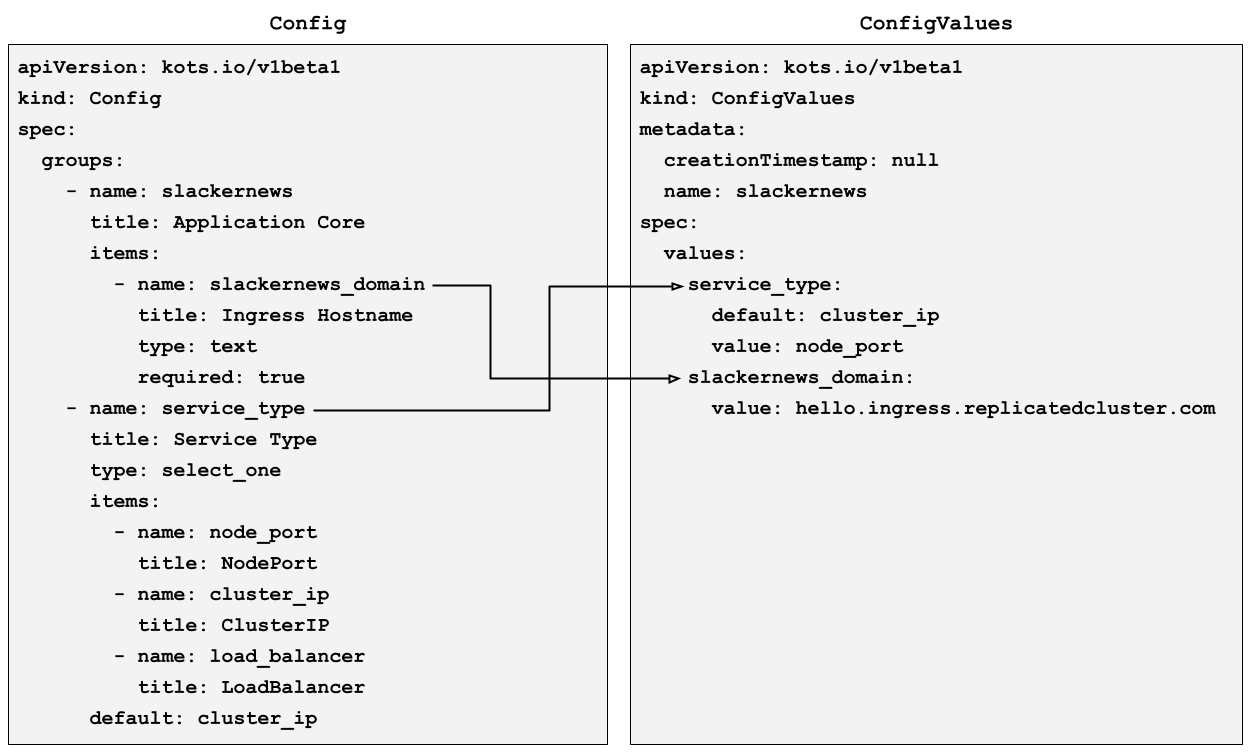
The following image shows how application configuration items defined a Config resource map to a ConfigValues resource:
View a larger version of this image
As shown in the preceding image, the values key in the ConfigValues resource lists each item from the Config resource by its name. For each item, the ConfigValues resource lists the user-supplied value and the default defined in the Config resource (if applicable).
Example
apiVersion: kots.io/v1beta1
kind: ConfigValues
spec:
  values:
    config_item_name:
      default: example_default_value
      value: example_value
    boolean_config_item_name:
      value: "1"
    password_config_item_name:
      valuePlaintext: exampleplaintextpassword
    select_one_config_item_name:
      default: default_option_name
      value: selected_option_name
Requirements
The ConfigValues resource must meet the following requirements:
- Must be valid YAML.
- It is not necessary to set a
valuefor each configuration item in the ConfigValues, unless the item isrequiredand has nodefaultset in the Config resource. - For any configuration items of type
passworddefined in the Config resource, set the value in plain text in the ConfigValuesvaluePlaintextproperty rather than in thevalueproperty. For example,valuePlaintext: somesecretvalue. Values set invaluePlaintextare automatically encrypted during installation. - All values must be strings. For booleans, integers, or floats, wrap the value in quotes (for example,
value: "1",value: "0", orvalue: "443").
Limitation
Replicated template functions are not supported in the ConfigValues resource. To use a template function for a config item's value, add it to the default or value property in the Config resource instead.
For more information about working with Replicated template functions, see About Replicated Template Functions.
ConfigValues spec
values.[item_name].default
The item's default value, as defined in the Config custom resource in the release.
Example
apiVersion: kots.io/v1beta1
kind: ConfigValues
spec:
  values:
    certificate_source:
      default: generate_internal
    deploy_postgres:
      default: "1"
      value: "0"
    service_type:
      default: cluster_ip
      value: node_port
    node_port_port:
      default: "443"
      value: "3000"
values.[item_name].value
The user-supplied value for the application configuration item.
Example
apiVersion: kots.io/v1beta1
kind: ConfigValues
spec:
  values:
    slack_clientid:
      value: T057KR02S
    slackernews_domain:
      value: hello.ingress.replicatedcluster.com
    slackernews_admin_user_emails:
      value: mandy@nitflex.com, jeff@nitflex.com, anil@nitflex.com
    service_type:
      value: node_port
    node_port_port:
      value: "443"
For KOTS or Embedded Cluster v2 installations, the value property in the auto-generated ConfigValues might also contain one of the following:
- A value rendered by a Replicated template function. For example, a
hiddenitem defined in the Config resource could use the Replicated RandomString template function to set the value withvalue: repl{{ RandomString 40}}. In this case, the template function generates the value for the item in the ConfigValues, not the user. For more information about using Replicated template functions, see About Replicated Template Functions. - An encrypted empty string. For any
passwordconfiguration items without a user-supplied value, the Admin Console sets the value to an empty string. In the ConfigValues generated for the installation, this empty string is automatically encrypted. - An empty mapping (
{}). For configuration items without a user-suppliedvalueor adefault, KOTS sets the value to{}.
values.[item_name].valuePlaintext
A plain text value. For any configuration items of type password, provide the password in plain text in the valuePlaintext property rather than in the value property.
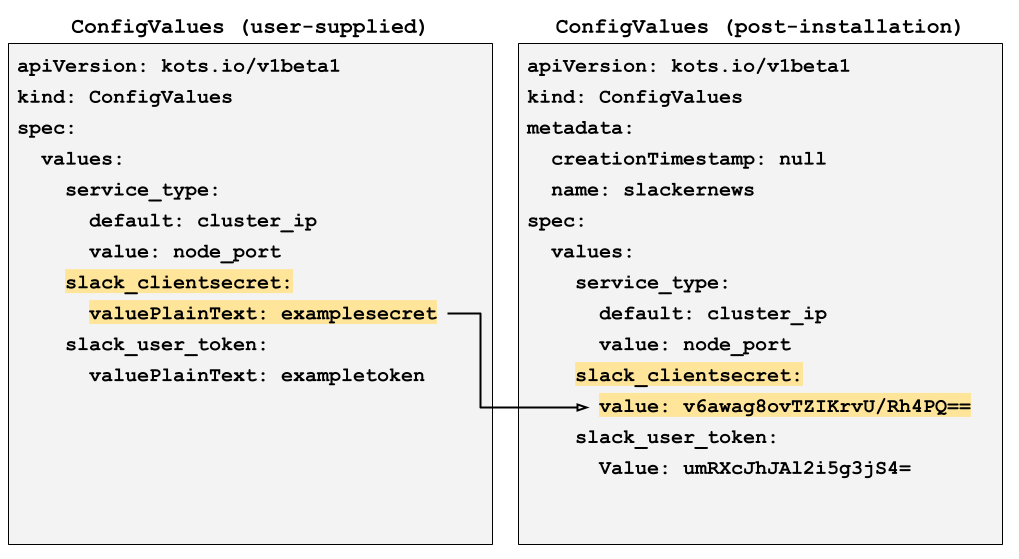
During installation, the installer encrypts the values set in valuePlaintext. In the ConfigValues resource automatically generated as part of installation, the installer saves these encrypted values in value properties. The following image shows how the installer encrypts a valuePlaintext value and adds it to a value property during installation:
View a larger version of this image
Example
apiVersion: kots.io/v1beta1
kind: ConfigValues
spec:
  values:
    slack_bot_token:
      valuePlaintext: examplebottoken
    slack_clientsecret:
      valuePlaintext: exampleclientsecret
    slack_user_token:
      valuePlaintext: exampleusertoken
(KOTS and Embedded Cluster v2 Only) Download the ConfigValues for an installation
This section applies only to installations with KOTS in an existing cluster or with Embedded Cluster v2.
During installation, KOTS automatically generates a ConfigValues file. Users can download the ConfigValues from the Admin Console View files tab or with the kots get config command.
To get the ConfigValues file from an installed application instance:
-
Install the target release in a development environment. You can either install the release with Replicated Embedded Cluster or install in an existing cluster with KOTS. For more information, see Online Installation with Embedded Cluster or Online Installation in Existing Clusters with KOTS.
-
Depending on the installer that you used, do one of the following to get the ConfigValues for the installed instance:
-
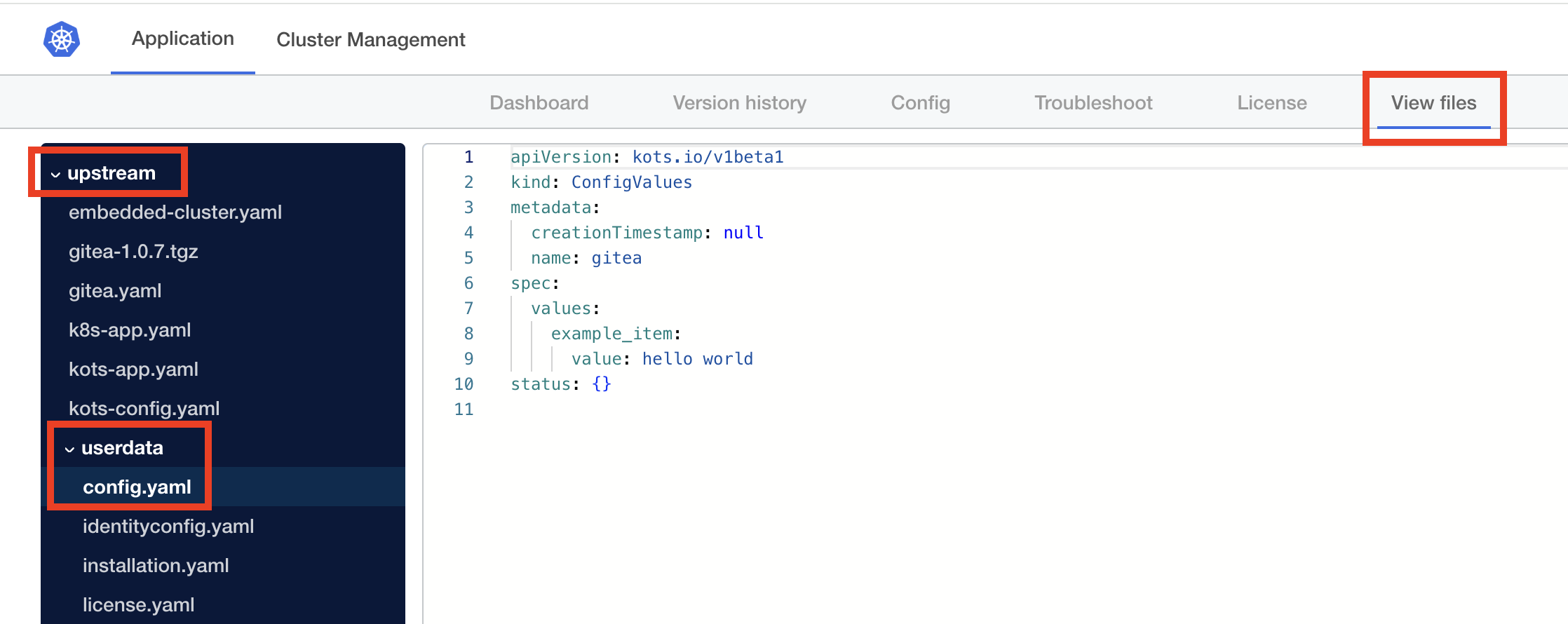
For Embedded Cluster installations: In the Admin Console, go to the View files tab. In the filetree, go to upstream > userdata and open config.yaml, as shown in the image below:
-
For KOTS installations in an existing cluster: Run the
kubectl kots get configcommand to view the generated ConfigValues file:kubectl kots get config --namespace APP_NAMESPACE --decryptWhere:
APP_NAMESPACEis the cluster namespace where KOTS is running.- The
--decryptflag decrypts all configuration fields withtype: password. In the downloaded ConfigValues file, the decrypted value is stored in avaluePlaintextfield.
The output of the
kots get configcommand shows the contents of the ConfigValues file. For more information about thekots get configcommand, including additional flags, see kots get config.
-